
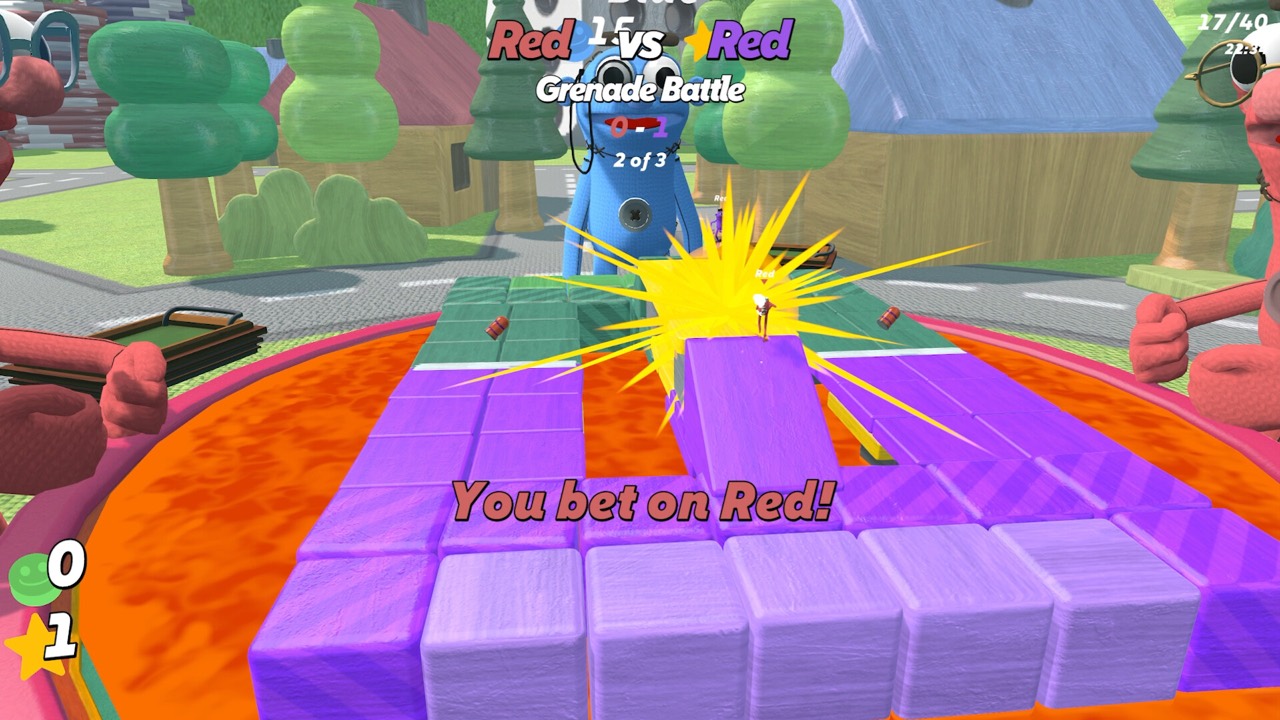
Quick Facts Before You Start
WE'RE ALL IN! is an online party game from Blast Furnace Games, published by Black Lantern Collective. It released on Steam for Windows and macOS on November 20, 2026, at a base price of $7.99. Matches hold one to eight players online, in private or public lobbies.
All betting uses in-game chips, never real money. Steam lists dozens of minigames in 1v1, team and free-for-all formats, plus customizable lobbies and unlockable cosmetics. Those pieces all connect through one loop, which the rest of this guide breaks down step by step.
The Core Loop in One Minute
The developer splits the game into three beats on its Steam page: bet, play and win. Before each minigame you put chips behind a contestant or team you expect to come out on top. Then the round is played, with some players competing and others watching from the betting table.
After the round, a correct pick pays out and your chip balance grows. Chips are not the score, though. The match is decided primarily by final star count, so chips only matter once you turn them into stars.
- Bet: wager chips on a pick shown on the round card.
- Play: compete in the minigame, or spectate if you are sitting out.
- Win: convert chips into stars, then survive final scoring with the most stars.
Step 1: Join a Lobby and Ready Up
Every match starts in an online lobby. The launch listing supports up to eight players, and you can use a private lobby for your own group or a public session to play with others. In filmed lobbies, players walk onto a ready platform and a counter tracks how many are ready.
Before anyone readies up, the lobby panel shows the round count and the number of enabled minigames. The host can adjust both, so agree on a session length first. Our lobby setup guide and minigame customization guide cover these screens in detail.
Step 2: Read the Round Card
Each round opens with a card that names the minigame, states its objective and shows the eligible picks. Sumo, for example, asks you to knock opponents off the ring, while Soccer asks you to kick the ball into the opposing goal. Reading the objective tells you which skills will matter.
The picks depend on the format. Team rounds offer teams, some free-for-all rounds offer your side against an Everyone Else option, and spectators can choose a named contestant. Always bet from the choices actually shown for your role in that round.
Step 3: Check the Stakes Before You Bet
The wager screen previews your balance if the pick wins and if it loses. In one recorded Sumo round, a player holding 150 chips saw 210 on a win and 90 on a loss for a 60-chip wager. Pushing the same bet all in changed the preview to 300 or zero.
That preview is the most useful number on the screen. If the loss figure would leave you unable to reach your next star, consider a smaller stake. Our betting risk guide explains when going all in is worth it.
Step 4: Play or Spectate the Round
If you are in the round, play to the objective on the card. Steam lists dozens of minigames across 1v1, team and free-for-all formats, so the skills change constantly. Obstacle races, button mashing, sumo rings and coin tosses all appear in footage.
If you are sitting out, you still have a stake. The publisher notes that spectators keep a wager riding and can move around the betting table to watch. Check the minigames list to learn the objectives you will meet most often.
Step 5: Convert Chips Into Stars
Stars are earned by converting chips, and the Steam page says their cost increases as the match goes on. Watch the Buy or Next Star At indicator in the HUD after every round. Official trailer scenes show prices of 200 and 300 chips, and a longer recorded session shows a 600-chip target.
Because the price only climbs, waiting rarely makes a star cheaper. Plan your wagers around the chips you need for the next one. The how to buy stars guide covers the HUD indicators.
Step 6: Survive Final Scoring
If your balance runs low, an in-game loan gives you chips to keep playing. That loan is collected at final scoring. The November 5 demo balance patch set a 100-token loan when the balance dropped below 15, with repayment at the end of the match.
If you cannot cover the debt with chips, stars can be sold to settle it, which lowers your final count. The developer also describes bonus stars awarded at the end for a mix of performance and luck. See debt explained and bonus stars for how these swing the standings.
Beginner Mistakes to Avoid
Most early losses come from treating chips as the score. A big chip stack that never becomes stars does not win the match. Convert when you can afford the displayed price, and keep a reserve for the next round.
- Betting all in every round, which can trigger a loan that is repaid from your final total.
- Ignoring the loss preview on the wager card.
- Waiting for a cheaper star, when the cost rises as the match progresses.
- Not reading the round card, especially in team rounds where you may only be able to back your own side.
- Forgetting to spend stars on cosmetics after play, which the developer lists as their post-match use.
Where to Go Next
Once the loop clicks, the next step depends on what your group struggles with. Betting decisions improve fastest with the how to bet on other players guide. Minigame picks get easier with our minigame tier list.
The Steam Community guides hub hosts player-made guides, but it showed no English entries at our research check. That is why this guide draws on the developer's Steam page, the official trailers and recorded gameplay. Every page on this wiki lists its sources at the bottom, so you can check the original material yourself.
Frequently Asked Questions
How do you win WE'RE ALL IN!?
Finish with the most stars after final scoring. Stars come from converting chips, so winning bets matter only once you turn the chips into stars.
How many players can join a match?
Up to eight players online. Steam also lists single-player, and private and public lobbies are both available.
What happens if I run out of chips?
An in-game loan keeps you playing, and the debt is collected at final scoring. Unpaid debt can force star sales. See debt explained.
Can I still bet when I am not playing the round?
Yes. Spectators pick a contestant and keep a stake on the result while they watch from the betting table.
Official Trailer
Sources and Further Reading
- Blast Furnace Games — WE'RE ALL IN! on Steam
- Black Lantern Collective — launch announcement (Nov 20, 2026)
- Blast Furnace Games — Bugfix and Balance Update (Nov 5, 2026)
- The Black Lantern Collective — Official Launch Trailer (YouTube)
- The Black Lantern Collective — Official Gameplay Trailer (YouTube)
- InfernoMS — WE'RE ALL IN! four-player session (YouTube, Nov 20, 2026)
- PopTopic — WE'RE ALL IN! preview (Nov 6, 2026)
- KongMNG Game Wire — WE'RE ALL IN! launch report (Nov 20, 2026)
- Steam Community — WE'RE ALL IN! guides hub